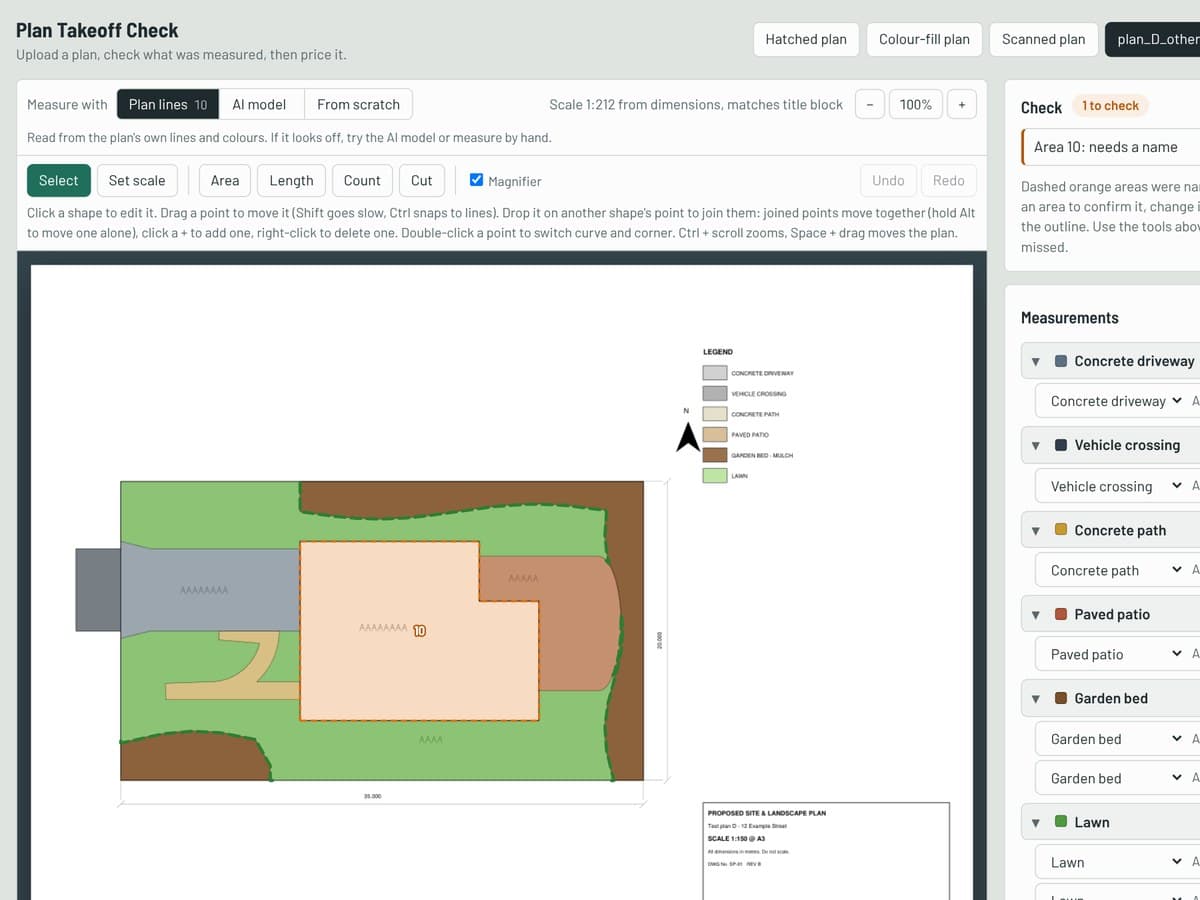
After building their websites, I started on something for the other end of the business. Every job starts with a plan, and before anyone can quote it, someone has to measure it: how much driveway, how much lawn, how many metres of fence, how many plants. Done by hand, that takes a while for every enquiry. So I'm building a tool that does the measuring and drafts the quote.
Reading the plan
You upload a plan PDF and it finds the areas, lengths and plant counts. Plans that come straight out of drafting software carry their own drawing inside the PDF, so the tool can read the exact shapes. It reads the legend, matches each colour or hatch to an area type, and works out the scale from the title block, double-checking it against the dimensions on the drawing in case the plan was printed at the wrong paper size.
Scans, photos and plans from other drafters don't have that, so for those I trained an image model that looks at a picture of the plan and colours in where the lawn, garden, gravel, concrete and decking are.
Training the model on Kaggle
The model is a U-Net, an image segmentation network that labels every pixel, built with PyTorch on a ResNet-34 encoder pretrained on ImageNet. It sorts each pixel into one of six classes: background, lawn, garden, stone, concrete or deck.
Building the dataset. The training data came from work the team had already done. Every job they measure in Groundplan, their takeoff software, gets exported as the plan with their hand-drawn areas on a separate layer, plus a legend listing each item's colour and total. I wrote a script that switches those layers off to render the bare plan (what the model sees), then fills each drawn area into a mask using its legend colour (the answer it should learn). To make sure the labels were right, it works out metres per pixel from Groundplan's own totals for every item and checks they agree. That gave 41 exports covering 17 distinct plans, 6 of them scans or marked-up photos. I then added 114 of Landscape Brothers' own colour-fill plans, labelled automatically by the tool's own plan reader.
Training. Training on my laptop would have taken far too long, so I packaged the dataset up as a private Kaggle dataset and trained in a Kaggle notebook on their free GPU. Each epoch takes random 512-pixel crops of the plans, mostly around the site so it learns the areas, but sometimes elsewhere so it learns that legends and title blocks are background. To get a model that copes with real-world plans from a small dataset, the crops are heavily augmented:
- Clean renders are made to look like phone photos and office scans, with blur, greyscale, paper tint, uneven lighting, noise and JPEG artefacts.
- Crops are randomly zoomed, flipped and rotated, since plans come at different scales and orientations.
- On Landscape Brothers' plans, the colours are greyed out or shuffled 60% of the time. Otherwise the model could just memorise their legend colours instead of learning what a lawn or garden bed actually looks like.
The loss combines cross-entropy and Dice loss, with rarer classes like deck and stone weighted more heavily so the model doesn't ignore them. It trains for 60 epochs with AdamW, a one-cycle learning rate schedule and mixed precision on the GPU.
Scoring it honestly. Validation holds out whole jobs the model never sees in training, so it can't score well just by recognising a site. It's also only scored on the Groundplan-labelled plans, since the colour-fill plans are easy and would flatter the numbers. On those held-out jobs it scores an IoU (how well its shapes overlap the real ones) of 0.77 on garden, 0.74 on lawn, 0.59 on concrete and deck, and 0.18 on stone, which is pale grey like roofs and paths and has few examples. That's a mean of 0.57.
Using it. The best checkpoint is exported to ONNX, so the measuring server can run it on a normal CPU with onnxruntime and no PyTorch, at about a second per tile. Before totalling, a clean-up step blanks out photos, logos, legends, title blocks and the inside of the house, which cut one test job's garden estimate from 206 m² to 33 m² against a true 21 m². Every confirmed takeoff becomes more training data, so the plan is to keep retraining as the team uses it.
A person still checks it
A plan often draws more than ends up in the job, so the tool never decides on its own. Anything it guessed at is outlined for checking, and there's a full set of editing tools on the plan: drag points, add curves, split an area in two, snap to the plan's lines, or draw in anything it missed. Once the measurements look right, they're priced at each business's rates into a draft quote.
What's next
It's still a work in progress. Next up is saving takeoffs, so the confirmed ones can feed back into training the model, reading concrete plans where the quantities are only written as notes, and swapping the placeholder rates for the real ones.